Your key account manager just handed in their notice. Friday afternoon, 4:47 PM.
They manage 38% of your revenue. They know every contact at your biggest client by name. Over the past four years, they quietly accumulated knowledge – inside their head, nowhere else. And now? Monday morning, someone else picks up the phone. Someone whose actual capabilities you can’t name off the top of your head.
This isn’t a hypothetical. It happens every single day in mid-sized companies – and in most cases, it was entirely preventable. Not through retention bonuses. Not through better coffee machines. Through skill transparency.
The Real Problem: You Don’t Know What Your Team Can Actually Do
According to Deloitte research, more than 60% of SME leaders have no structured overview of their employees’ actual capabilities. What’s discussed in annual reviews rarely makes it into a system. What lives in managers’ heads stays there. And what employees themselves see as their strengths? Nobody’s asking.
The result: tasks are misallocated. Potential goes untapped. And at worst, someone resigns – because they simply felt underutilised.
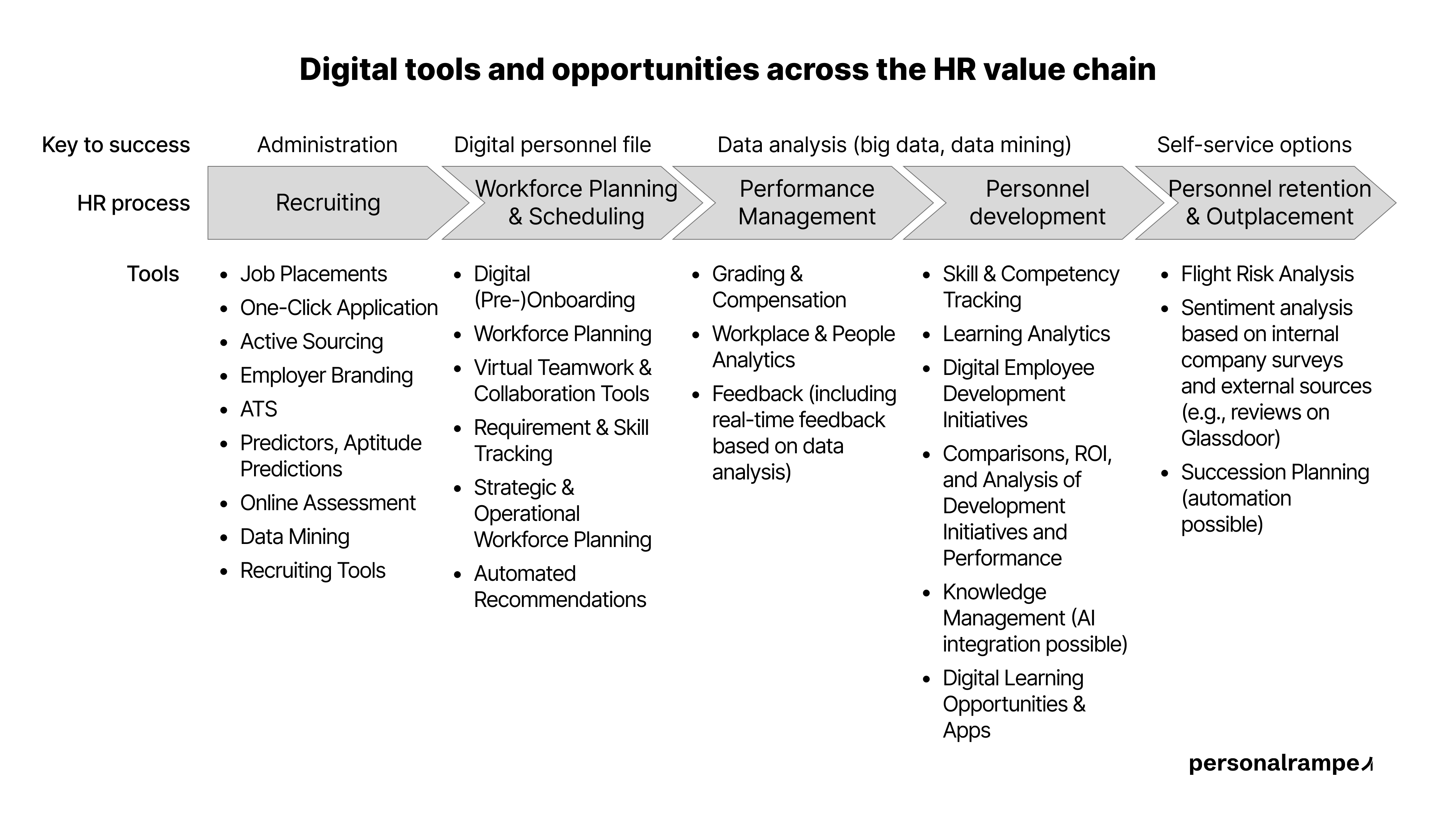 From recruiting to outplacement: skill and competency tracking is a central pillar of modern HR value chains. Source: personalrampe
The graphic makes it clear: skill and competency tracking belongs in the personnel development phase – precisely where SMEs most frequently have gaps. Between performance management and employee retention sits a data void that heatmaps can close.
The Story That Changes Everything
At a mid-sized engineering firm with 80 employees, a design engineer had been working in technical documentation for four years. Routine tasks. Done reliably, no complaints.
What her direct manager didn’t know: in her own time, she had completed two certifications in BIM software (Building Information Modeling) – skills the company urgently needed and was paying external consultants to provide.
When the company began using Personalrampe Skills to compare self-assessments with manager assessments, the gap surfaced immediately. The employee rated her BIM skills at 4 out of 5. Her manager had left that field completely blank – because she simply didn’t know these skills existed.
This is exactly the kind of blind spot that a well-maintained Excel sheet will never surface by itself. The software flagged the discrepancy automatically – without anyone having to search for it manually. HR could then reach out to the manager proactively. A conversation with the employee followed. Three months later, she was leading the company’s first internal BIM project.
She had almost quit. Because she felt undervalued.
This isn’t an isolated case. It’s a systemic failure – one that a heatmap can surface and solve.
5 Steps: How a Skill Heatmap Works – and Where Excel Hits Its Limits
A heatmap is a colour-coded overview showing where your team excels and where critical gaps are hiding. You can start the logic in Excel – but by step 3, you’ll notice where the cracks appear.
Step 1: Define Your Skill Inventory
Start by defining the relevant competency areas for your business. Typical categories:
- Technical skills (software, industry knowledge, certifications)
- Methodological skills (project management, data analysis)
- Social skills (client communication, team leadership)
- Digital skills (ERP systems, AI tools)
In Excel: Set up columns manually, define dropdown lists, and hope that everyone fills in the sheet the same way. Tip: cap at 15–20 skills – more causes survey fatigue and unusable data.
In Personalrampe Skills: Categories are pre-configured and customisable. The assessment runs directly in the platform – structured, consistent, no formatting chaos.
Step 2: Run a Dual Assessment – Self vs. Manager
Have each employee rate their own skills on a scale of 0 to 5. In parallel, direct managers rate the same skills blindly – with no access to the employee’s self-assessment.
In Excel: Two separate files, manual merging, copy-paste errors, and no mechanism to flag fields that were left blank.
In Personalrampe Skills: Both rounds run through the platform. The system sends reminders for missing assessments, merges the data, and displays gap values on the heatmap for visual identification. Blank fields – meaning a manager’s blind spots – are visually highlighted, not silently ignored.
Step 3: Visualise the Heatmap
From the averaged scores, a colour-coded matrix emerges:
- 🔴 Red = 0–1.9 (critical gap)
- 🟡 Yellow = 2.0–3.4 (development needed)
- 🟢 Green = 3.5–5.0 (strength)
In Excel: Set up conditional formatting manually, re-check it after every update. Filtering by department means: new sheet, new formatting, new risk of errors.
In Personalrampe Skills: The heatmap is interactive. Filter by department, role, hierarchy level, or time period – one click. No new file. No stale views. The heatmap updates automatically as new assessments come in.
Step 4: Eliminate Error Sources Before You Act
The three most common mistakes in SME skill tracking:
Error 1 – Social desirability bias: Managers rate too generously to avoid conflict. Fix: anchored rating scales with concrete behavioural examples at each level – built directly into the rating interface in Personalrampe Skills, manually maintained (and usually forgotten) in Excel.
Error 2 – Blind spots: Managers leave fields blank because they don’t know the employee’s skills (→ exactly as in the BIM example). In Excel, these gaps disappear into the noise. In Personalrampe Skills, they’re surfaced automatically and treated as what they are: a communication problem, not a data problem.
Error 3 – Single snapshot without repetition: A heatmap you never update tells you nothing about development direction. Excel sheets go stale and nobody systematically maintains them. In Personalrampe Skills, biannual updates are structurally built into the process – with automatic reminders.
Step 5: Define Actions and Measure ROI
This is where the largest – and most expensive – difference lies.
In Excel: You can see where the gaps are. What you do about them remains entirely manual. Looking for a succession candidate? Multiple meetings. Calculating the ROI of a training course? Separate spreadsheet, built by hand, never current.
In Personalrampe Skills: The heatmap enables visual identification of suitable internal candidates for critical positions – with clear skill comparisons and gap breakdown against role requirements. Development measures are linked directly to skill improvements. Result: you can see that the Python training for five employees (€10,000 investment) enabled an internal project worth €80,000 in external costs saved – ROI: 800%, payback period: 1.5 months. Not estimated. Calculated from actual data.
| Task | Excel | Personalrampe Skills |
|---|
| Build heatmap | 2–3 weeks of setup | 2-minute implementation |
| Surface self/manager gaps | Manual, error-prone | Visual, real-time |
| Filter by department | Create a new sheet | One click |
| Identify succession candidates | Multiple meetings | Automatic recommendation with % match |
| Calculate training ROI | Separate table, built by hand | Automated, per measure |
| DSGVO / GDPR compliance | Unclear – who has file access? | EU hosting, SSO, audit log |
What This Means in Real Numbers
An SME with 100 employees that fills three key roles externally each year spends an average of €15,000–25,000 per position on recruiting, onboarding, and productivity loss. If even one of those roles is filled internally through early-identified development potential, that’s €15,000 saved – per year, per case.
External specialists in niche skills cost between €800 and €1,800 per day. Uncovering dormant internal expertise through a heatmap – as in the BIM example – eliminates these costs entirely.
Personalrampe Skills starts at €229 per month for up to 50 employees – including all features, EU hosting, SSO, and no vendor lock-in. Full data export (CSV, Excel) is available at any time. For context: manually building a functional Excel heatmap with gap values, filter logic, and a reliable collection process typically costs 2–3 weeks of HR working time on the first setup – and is often outdated within six months.
Why 2026 Is the Inflection Point
The skills shortage is forcing SMEs to think internally before they recruit externally. The baby boomer generation is retiring – and with them goes decades of institutional knowledge, unless it’s documented first. Meanwhile, AI-powered systems are making skill tracking cheaper and more precise than ever.
Companies that build skill transparency infrastructure now will have a structural competitive advantage in three years over those still operating blind.
The question is no longer whether – only when.
Conclusion: Heatmaps Aren’t an HR Luxury. They’re Risk Management.
Your next key account manager will eventually resign. That’s statistics. The question is whether you’ll know in seconds who internally can step up – or whether you’ll be starting from scratch again.
Starting a heatmap in Excel is better than nothing. But surfacing blind spots automatically, identifying succession candidates in one click, and proving the ROI of every training measure – that’s the difference between a tool and a system.
Want to go deeper?
Download our free e-book: How SMEs use digital skill management to shape the future of people development – with templates, checklists, and concrete tool recommendations.
👉 Download the E-Book now → personalrampe.de/ebook


